
SmartScout helps online arbitrage sellers find profitable products faster by using real Amazon data instead of guesswork.
You can filter for demand, price, competition, and brand performance before checking any retail site.
This guide shows how to use SmartScout for online arbitrage, which tools matter most, and how to build a repeatable sourcing process that actually works.
Key Takeaways
- SmartScout helps online arbitrage sellers find profitable products using real Amazon data.
- Tools like Subcategories, Products, and the UPC Scanner make sourcing faster and more targeted.
- The Essentials plan is best for OA and includes everything needed to scan, filter, and validate leads.
How SmartScout Helps With Online Arbitrage
SmartScout helps you do online arbitrage by showing which products are actually worth sourcing – before you ever browse a retail site.
You start with Amazon data: filter subcategories by demand and seller count, find products with consistent sales and low competition, then use tools like the UPC Scanner to check if those items are available cheaper elsewhere.
With SmartScout, you can:
- Identify underserved niches with strong demand and fewer sellers
- Find proven ASINs that sell consistently but aren’t flooded with competition
- Spot profitable brands and reverse-engineer successful OA sellers
- Scan supplier or retailer price lists in bulk to match against winning ASINs
- Validate profit margins before spending time sourcing
It’s a faster, more focused way to build an OA product list using real data – not guesswork.
Key SmartScout Tools for Online Arbitrage
SmartScout offers several tools that help online arbitrage sellers find profitable products more efficiently. Here are the ones that matter most:
Subcategories

Products
This is your core research tool. You can filter ASINs by price, BSR, review count, number of sellers, and Amazon In-Stock Rate %. These filters help you spot listings with strong sales, manageable competition, and solid margin potential.
For OA targeting, combine the Amazon In-Stock Rate % filter with Number of FBA Sellers to find products Amazon rarely has in stock and that only a few FBA sellers list. These gaps give you a better chance to step in, win the buy box, and profit before competition increases.

Brands

Sellers & Seller Map

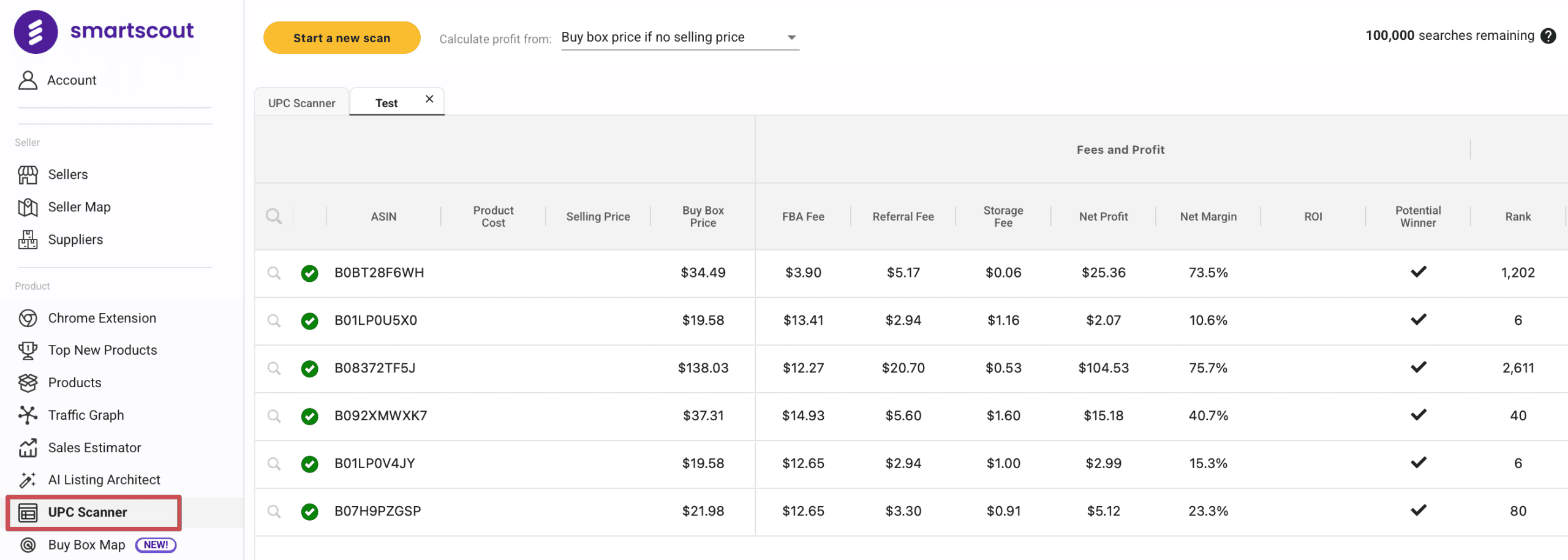
UPC Scanner
Chrome Extension
The Chrome extension overlays SmartScout data on Amazon and retailer product pages. Use it for quick profit checks and to validate potential leads on the fly.

How to Use SmartScout for Online Arbitrage (Step-by-Step)
SmartScout gives you a structured process to source high-potential products using real marketplace data.
Here’s how to use it for online arbitrage:
- Choose a niche using Subcategories: Start by filtering categories based on demand, price point, and competition. Focus on areas where Amazon has low presence and third-party sellers are active but not overcrowded.
- Find viable ASINs in the Products view: Search for products with healthy sales volume and clear buy-box stability. Give extra attention to listings with low ratings or weak content – they often signal easier wins.
- Identify brand patterns: Use the Brands tool to spot companies with successful products but minimal seller overlap. These are great targets for both reverse-sourcing and lead building.
- Review seller activity: Check which sellers are moving those products consistently. Look at storefront depth and how often they go out of stock – this reveals gaps you can fill.
- Scan price lists with the UPC Scanner: Upload retailer or supplier lists and let SmartScout flag profitable matches. Focus on replenishable items or leads with strong ROI.
- Verify your picks: Use SmartScout’s profit estimates and, if needed, tools like Keepa to confirm price stability and avoid risky listings.
- Build and update your OA list: Save qualified ASINs, organize by category or margin, and revisit weekly to refresh your sourcing pipeline.
How Much Does SmartScout Cost for Online Arbitrage?
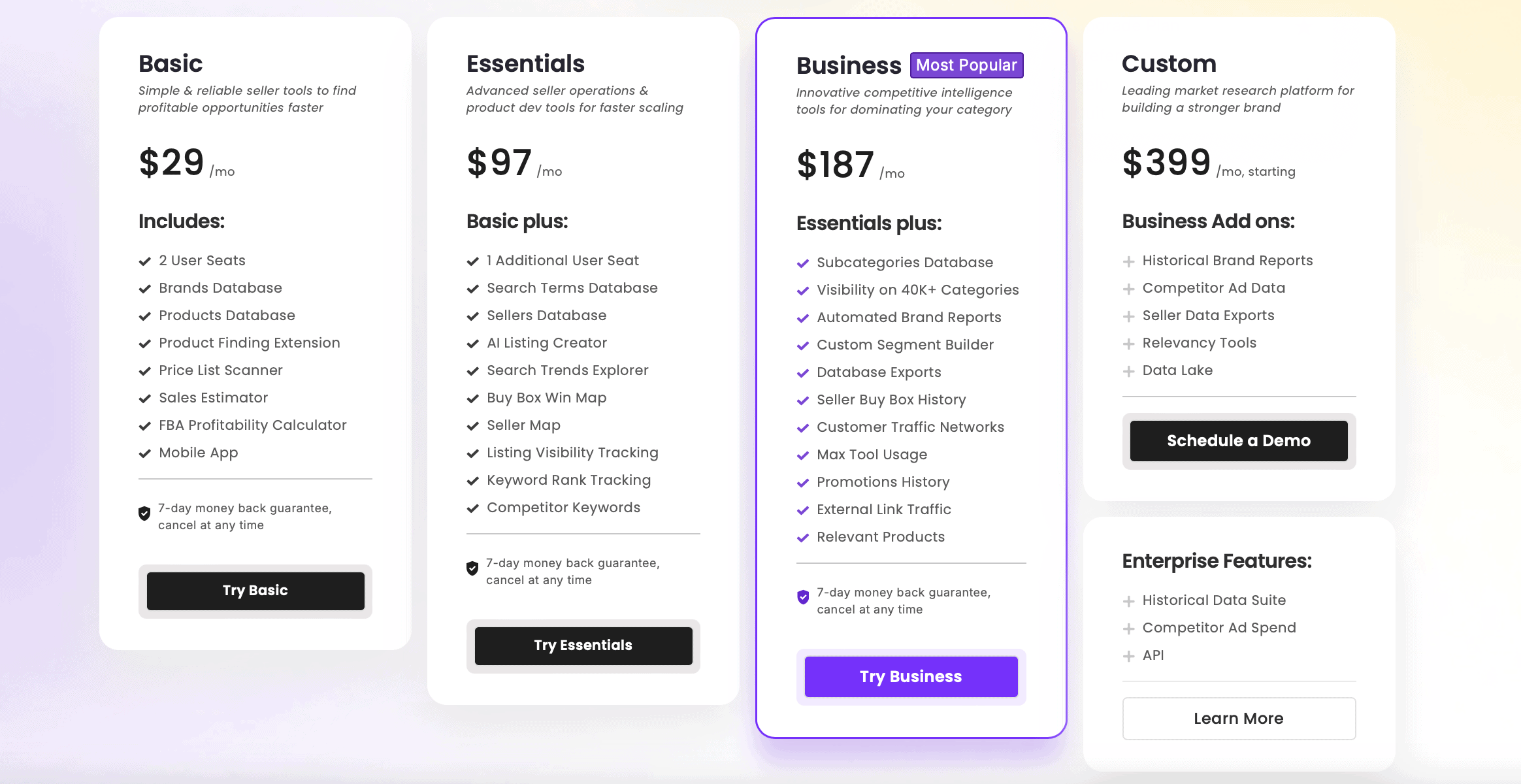
SmartScout’s core online arbitrage tools such as Subcategories, Products, Brands, Sellers, and the Chrome Extension are available on all paid plans.
If you want to use the UPC Scanner to bulk-check product lists, you’ll need the Essentials or Business plan. These tiers also unlock more filters and seller insights, which are especially useful for high-volume OA workflows.
For a full breakdown, check our SmartScout pricing guide and see which plan fits your sourcing strategy.
Don’t forget to grab your SmartScout discount here to save up to 25%.
Frequently Asked Questions
Is SmartScout the Best Software for Online Arbitrage?
Do I Need Software to Start an Online Arbitrage Business?
Which Smartscout Plan Is Best for Online Arbitrage?
Start Sourcing Smarter With SmartScout
SmartScout makes online arbitrage faster and more focused by helping you find products that already have demand and profit potential. Instead of chasing random deals, you build a sourcing process backed by real data.
Get up to 25% off SmartScout with our exclusive coupon and unlock every tool you need to grow your online arbitrage business.


