SmartScout makes private label simple. Plug in a few filters, follow the data, and spot products worth selling.
In this guide, you’ll learn how to use SmartScout for private label the way real private label sellers do by tracking demand, margins, and competition before making a move. By the end, you’ll know how to turn numbers into product ideas that actually sell.
Key Takeaways
- Use SmartScout to find private label niches with real demand and no dominant brands.
- Check profit margins, review counts, and pricing to avoid high-risk products.
- Plan your inventory and ads using SmartScout’s sales and keyword data to launch smarter.
SmartScout Private Label Workflow (Quick Overview)
In this guide, you will use SmartScout in a simple private label workflow:
- Find profitable subcategories with real demand and healthy seller share
- Choose a niche where you can realistically compete as a new brand
- Analyze competitors and pricing to spot gaps you can fill
- Check profit and risk before talking to suppliers
- Plan your first order and ad budget using SmartScout sales and keyword data
Once you understand this flow, you can repeat it for any category you want to test.
Step 1: Find a Profitable Niche with SmartScout
A winning private label product starts with the right niche – steady demand, healthy pricing, and space to compete. SmartScout’s Subcategories tool helps you find that by showing live Amazon data across thousands of categories.
Start by opening the Subcategories view from your SmartScout dashboard.
Pick a broad category you’re interested in, like Pet Supplies, Home & Kitchen, or Sports & Outdoors. You’ll see a list of subcategories with real metrics, including:
- Estimated Monthly Revenue – how much customers are spending in that niche
- Seller Revenue Share – how much of that revenue goes to 3P sellers (ideal for private label)
- Number of Brands – more brands usually means more opportunity
- Average Review Count – helps you gauge how competitive the top listings are
- Average Rating – lower ratings = more room to improve
Look for subcategories with:
- Solid but not massive revenue (e.g. $10M–$50M/month)
- High seller revenue share (70%+ is ideal)
- Lower average reviews (under 1000 is easier to compete)
- A good number of brands (not dominated by 1–2 names)
Once you spot a promising subcategory, click to expand it and see what niches sit underneath. For example:
- Pet Supplies → Fish & Aquatic Pets
- Sports & Outdoors → Camping & Hiking → Sleeping Bags
- Tools & Home Improvement → Painting Supplies
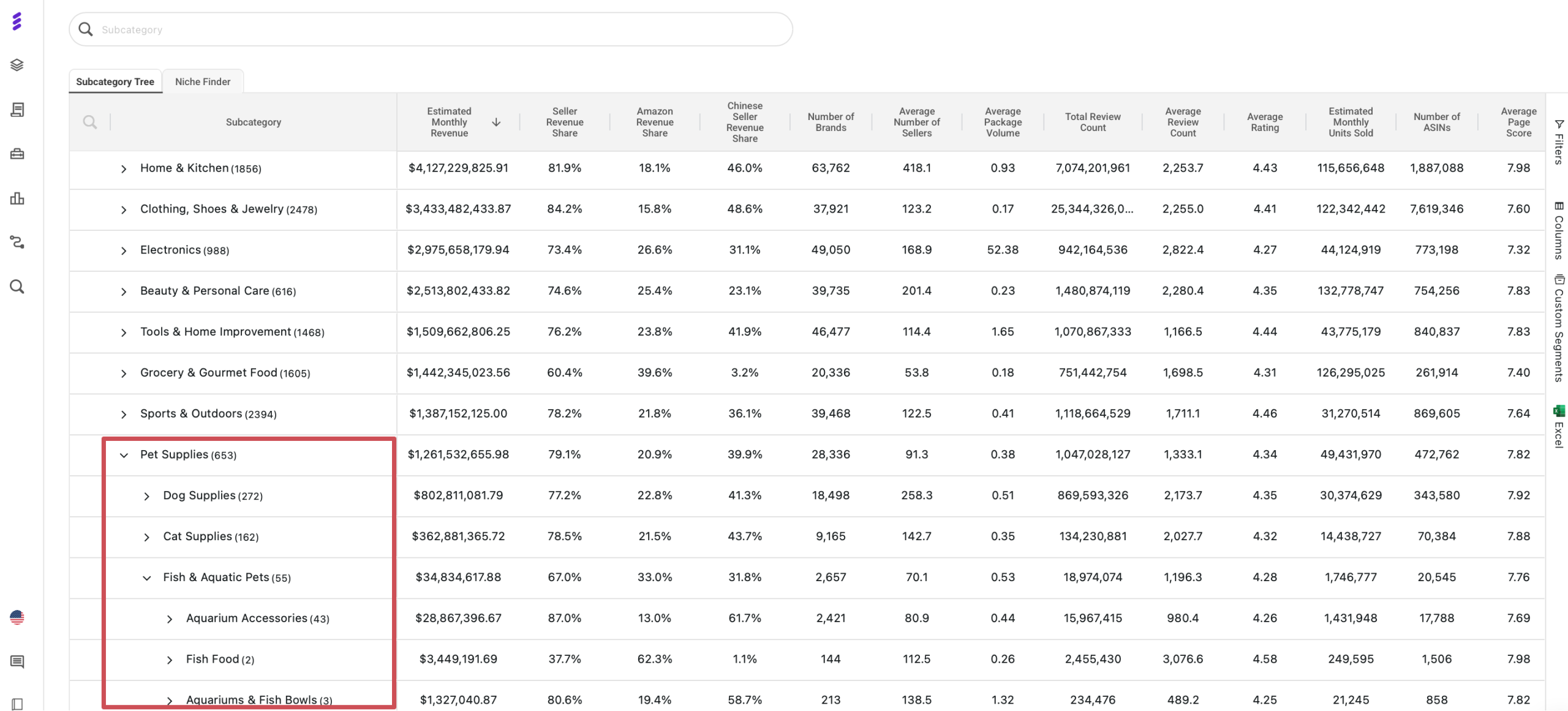
Save 3–5 subcategories that show a balance of demand and competition. This is how you let SmartScout highlight where customers are already buying, without diving into saturated markets.
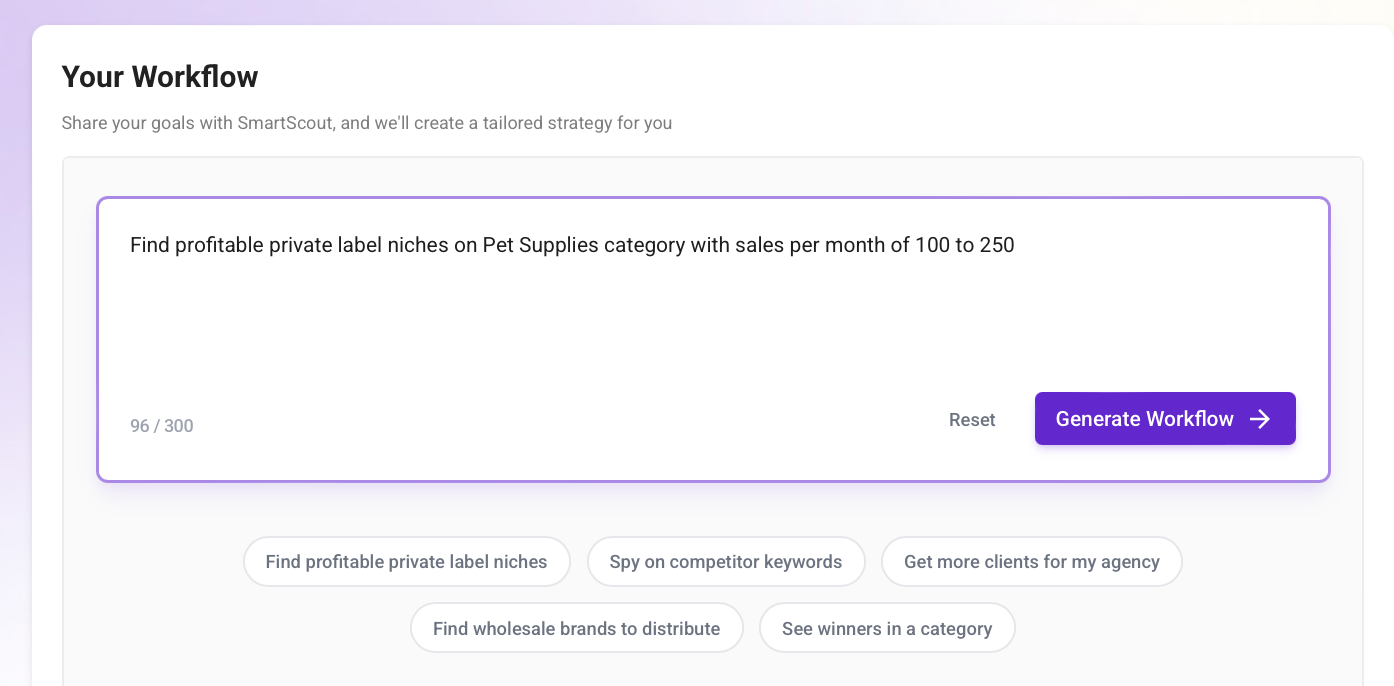
You can also use SmartScout’s new Workflow tool to auto-generate a filtered research flow. Just enter a goal like “Find private label niches in Pet Supplies with 100–250 monthly sales” and let it guide you from there.
Step 2: Choose a Niche You Can Actually Compete In
Once you’ve saved a few promising subcategories, the next step is to figure out which one gives you a real shot as a private label seller. This is where you shift from broad market data to focused niche-level signals.
Open one of your saved subcategories and start by checking:
1. Front-Page Revenue Spread
Look at the estimated monthly revenue for the top listings. You want a niche where:
- Total front-page revenue is strong (around $150K–$300K)
- Revenue is shared across multiple listings, not just one or two top sellers
- No brand is clearly dominating the entire niche
This means the market is active – but not controlled by one big player.
2. Sales Distribution
Scan for multiple listings doing 100–250 sales/month. That shows demand is steady and not concentrated at the top. Avoid niches where one listing sells thousands and everyone else barely moves product.
3. Review Count vs. Sales
Check how many reviews the top listings have. Ideal patterns:
- Products with under 100 reviews still making sales
- Review counts are spread out (not all in the 1,000+ range)
- You see listings ranked high with average images or minimal content
This tells you the niche still rewards new entries – and isn’t locked down by review-heavy veterans.
Step 3: Analyze Competitors and Pricing in Your Niche
Now that you’ve found a niche with real potential, it’s time to look closer at who you’re up against and how products are priced. This is where SmartScout helps you understand what’s working – and how to do it better.
1. Check Price Spread Across Top Listings
In your selected subcategory or product list, compare the Buy Box prices of the top 10–20 products. You’re looking for:
- A healthy price range (e.g. $25–$60)
- Noticeable price gaps between similar products
- Listings that charge more due to better quality, bundles, or branding
If one product is selling at $24 and another at $45 in the same niche, check what justifies the higher price. That’s a clue on where you can position your offer.
2. Look for Weak Listings
Click into the top sellers and review their:
- Images (low quality or unbranded = opportunity)
- Bullet points (short, generic copy = easy to beat)
- Number of variations (can you bundle or size better?)
- A+ Content (missing or poor design = easy upgrade)
If bestsellers have weak listings and still sell well, you have room to stand out with a polished offer.
3. Review Brand Concentration
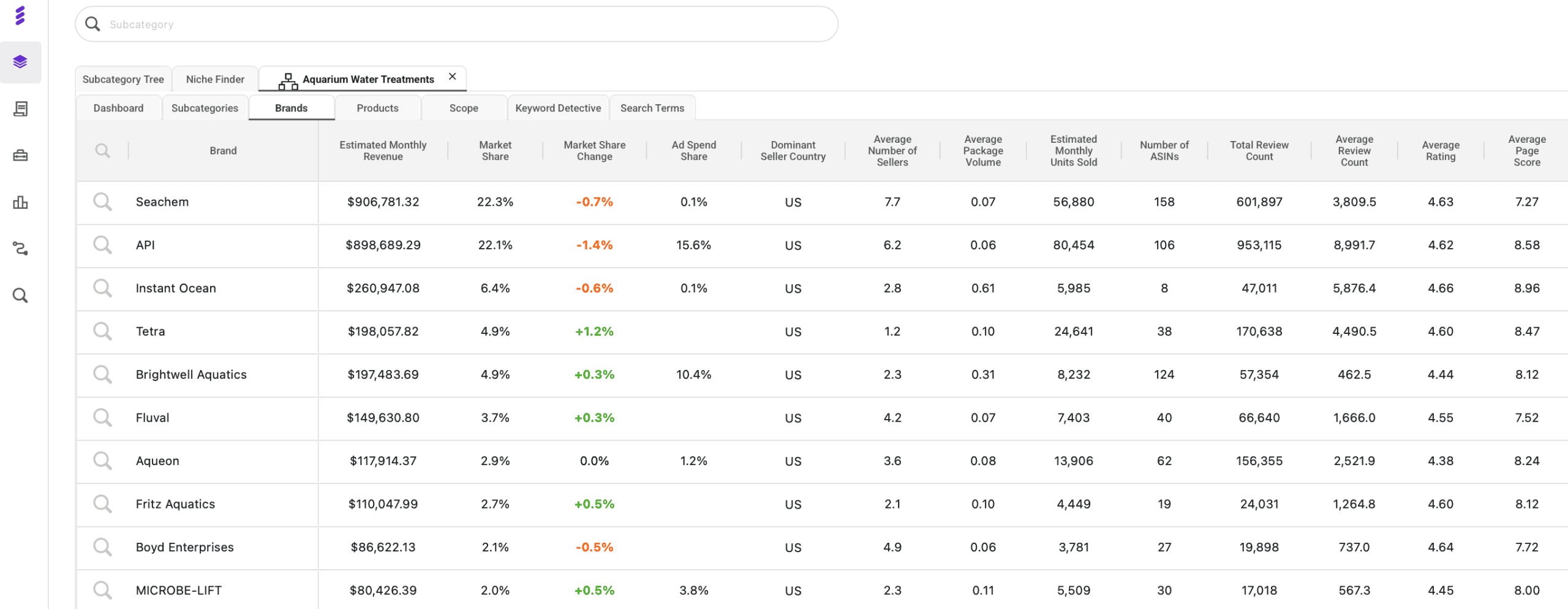
In SmartScout, check the Brands view for your niche. This shows how revenue is split across competing brands. Look for:
- Revenue spread out across several brands, not one or two controlling everything
- Multiple private label-style brands with average listings making steady sales
- No major household names dominating the space
This confirms the market is open enough for new sellers to compete – and profit.
Step 4: Check Profit and Risk Before You Commit
Before you move forward with a private label product, use SmartScout’s numbers to see if it can actually make money.
Take a few of the top products in your niche and do a quick margin check. Look at the selling price, estimate the FBA fees, and add your landed cost from the supplier. For example, if a product sells for $34.99, FBA fees are about $10 and your landed cost is $9, your profit per unit is around $15. That’s a healthy margin.
As a private label seller, you want at least 30% profit margin after all fees. If you are below that, one small price change or a bit of ad spend can wipe out your profit.
Next, glance at the price and sales history. If prices crash often, or you see constant discounting, the niche may be unstable. Combine that with basic risk checks: skip products that are hard to ship, easy to break, full of IP risk, or super seasonal.
If the margin looks strong, prices are stable, and risk is low, the product stays on your list. If not, move on to the next idea.
Step 5: Plan Your Inventory and Ads with SmartScout
Once you have a solid product idea, use SmartScout to decide how much to order and how hard to push with ads.
Open the Products view for your niche and look at a few similar listings. Check their estimated monthly sales to get a feel for realistic volume. If the top private-label style products do around 900–1,200 units a month, you might aim for something like 20–40 units a day at launch. That helps you pick a first order size instead of guessing.
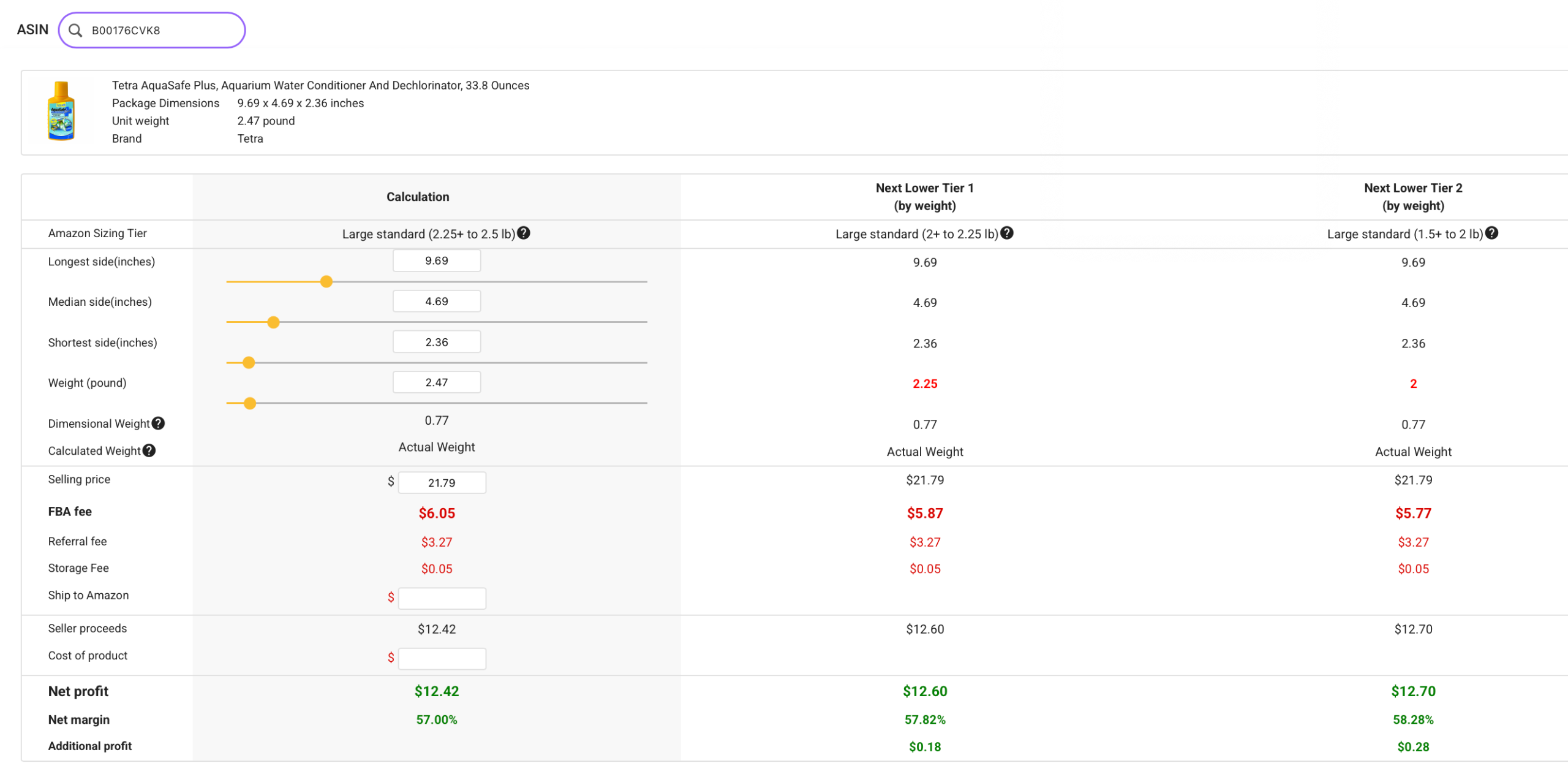
Then use the FBA Calculator to plug in your price, fees, and landed cost. This shows your real profit per unit and tells you how much ad spend you can safely reinvest.
For ads, start with AdSpy. Pull the main keywords your competitors are already paying for, then refine that list with Keyword Detective or Search Terms to keep only the most relevant terms. Use those as your core PPC targets with a simple, controlled daily budget that fits your margin.
The idea is straightforward. Products + FBA Calculator give you a data-backed inventory plan. AdSpy + keyword tools give you a focused keyword list. Together, they let you launch with numbers, not hope.
Which SmartScout Pricing Plan Should You Choose for Private Label?
SmartScout has multiple pricing tiers, but you don’t need the highest one to succeed with private label. What matters is having access to the right tools – mainly product-level data, subcategory visibility, keyword research, and the FBA calculator.
Here’s a quick breakdown of SmartScout’s current plans and which one fits best depending on where you are in your private label journey:
| Plan | Monthly Price* | Best For | Key Tools for Private Label |
|---|---|---|---|
| Basic | $29 | New sellers validating 1–2 products | Product database, brand data, FBA profit calculator |
| Essentials | $97 | Growing sellers adding SKUs regularly | Subcategory research, search terms, keyword tracking |
| Business | $187 | Brands or teams launching multiple products | Advanced filters, AdSpy, trend tracking, bulk exports |
| Enterprise | Custom | Agencies and large brands | All features, historical data, API, dedicated support |
*Pricing is based on monthly billing and may be discounted with annual plans or SmartScout promo codes.
If you’re just getting started, the Basic plan is enough to follow the workflow in this guide. If you’re actively scaling or researching multiple products at once, Essentials offers more flexibility without overspending. For a full breakdown, check out our SmartScout pricing guide.
Frequently Asked Questions
Is Amazon Private Label Still Profitable?
Final Thoughts
SmartScout turns private label from guesswork into a simple data routine. You find a niche with real demand, pick a sweet spot where mid-sized sellers still win, check profit and risk, then plan inventory and ads around real numbers instead of hope.
If you follow the steps in this guide each time you research a new product, you’ll make fewer bad bets and spend more time on ideas that actually have room to grow.
Ready to put it into action?
Use our SmartScout link and save up to 25% off SmartScout on your plan. Open the tool, run this workflow on one category you like, and let the data show you your next private label product.