If you’re looking into SmartScout for wholesale, you’re not just testing another Amazon tool. You’re trying to build a reliable system to find suppliers, check listings, and get approved for products you can reorder every month. This guide walks you through exactly how to use SmartScout for Amazon wholesale, why it works, what it costs, and how it compares to other tools.
Let’s break it down step by step so you can start finding real opportunities – not just data.
Key Takeaways
- SmartScout helps Amazon wholesale sellers find profitable brands, evaluate competition, and uncover real supplier leads without manually scanning ASINs.
- You can follow a simple workflow: set sourcing criteria, use Brand Search and Seller tools to find suppliers, vet top ASINs, then contact and test with a first PO.
- SmartScout offers several pricing options so Amazon wholesale sellers can choose a plan that fits their budget and sourcing needs.
Why SmartScout is Worth It for Amazon Wholesale
SmartScout is worth it for Amazon wholesale because it helps you find profitable brands, evaluate seller competition, and identify real supplier leads – all without manually scanning ASINs.
Instead of chasing individual listings, you can filter entire brands by revenue, seller count, price range, and Amazon presence. This makes it easier to avoid saturated products or brands where Amazon dominates the Buy Box.
SmartScout also gives you visibility into which sellers are already moving those brands. With tools like Sellers search and Seller Map, and by looking at the overlapping brands those sellers carry, you can uncover potential distributors, spot regional wholesalers, and build out your catalog faster.
You also get access to Traffic Graph and Subcategories explorer – great for understanding demand patterns and expanding into related niches.
For wholesale-focused sellers, SmartScout does more than find products. It gives you a clear map to find brands worth contacting, evaluate listings before you invest time, and build a pipeline you can reorder from consistently.
How to Use SmartScout for Amazon Wholesale
Set Clear Sourcing Criteria
Before you search, decide what you want. Here’s a solid starting point:
- Product price between $20 and $70
- Brand revenue between $50k and $500k per month
- 2 to 8 FBA sellers per listing
- Amazon is not the seller (or has low Buy Box share)
- Listings show price stability and steady demand
- You prefer replenishable products and consistent sellers
You can filter all of this directly in SmartScout’s Brand Search tool. It’s fast, visual, and helps you stay focused.

Find Wholesale Suppliers with Brand Search
Use SmartScout’s Brand Search to build your shortlist. Start with your filters – price, seller count, and Amazon presence. Look for brands with healthy volume but not too much competition.
If a brand shows stable pricing and a manageable number of sellers, save it. These are your Tier 1 outreach targets.
Map Potential Distributors
After shortlisting brands, go to Sellers search. This shows which sellers carry those brands and what else they sell. Look for stores that carry multiple strong brands – they’re likely distributors.
You can also use Seller Map to see where these sellers are located. This is helpful for identifying US-based wholesalers that might be open to new accounts.

Vet the Top ASINs
SmartScout lets you analyze ASINs from your target brands. Here’s what to check:
- Price trends and Buy Box history
- In-stock rates and seller turnover
- Review volume and growth rate
- Product variations and size/dimensions
- Any signs of hazmat, meltables, or restricted items
Use the built-in FBA Calculator to estimate your margin. This saves time and keeps your deal pipeline clean.

Prioritize Your Leads
After reviewing brands and ASINs, rank your list. Score each brand on key factors like:
- Revenue per seller
- Buy Box stability
- Amazon presence
- Pricing behavior
- Number of active FBA sellers
Put the best brands into Tier 1 and start your outreach there.
Contact Suppliers with a Simple Email Sequence
SmartScout doesn’t give direct contact info for every brand, but once you have names, you can usually find emails or websites. Reach out using a short, professional email. Highlight your strengths: MAP compliance, low return rates, and a consistent ordering schedule.
Follow up two or three times. If there’s no reply after a week or two, move on.
Track Your Orders and Repeat
Once approved, place your first order. Then track:
- Time to first PO
- Reorder cycles
- Gross margin vs. your estimate
- Product performance
- Supplier responsiveness
Use this data to refine your criteria and scale faster.
How Much Does SmartScout Cost?
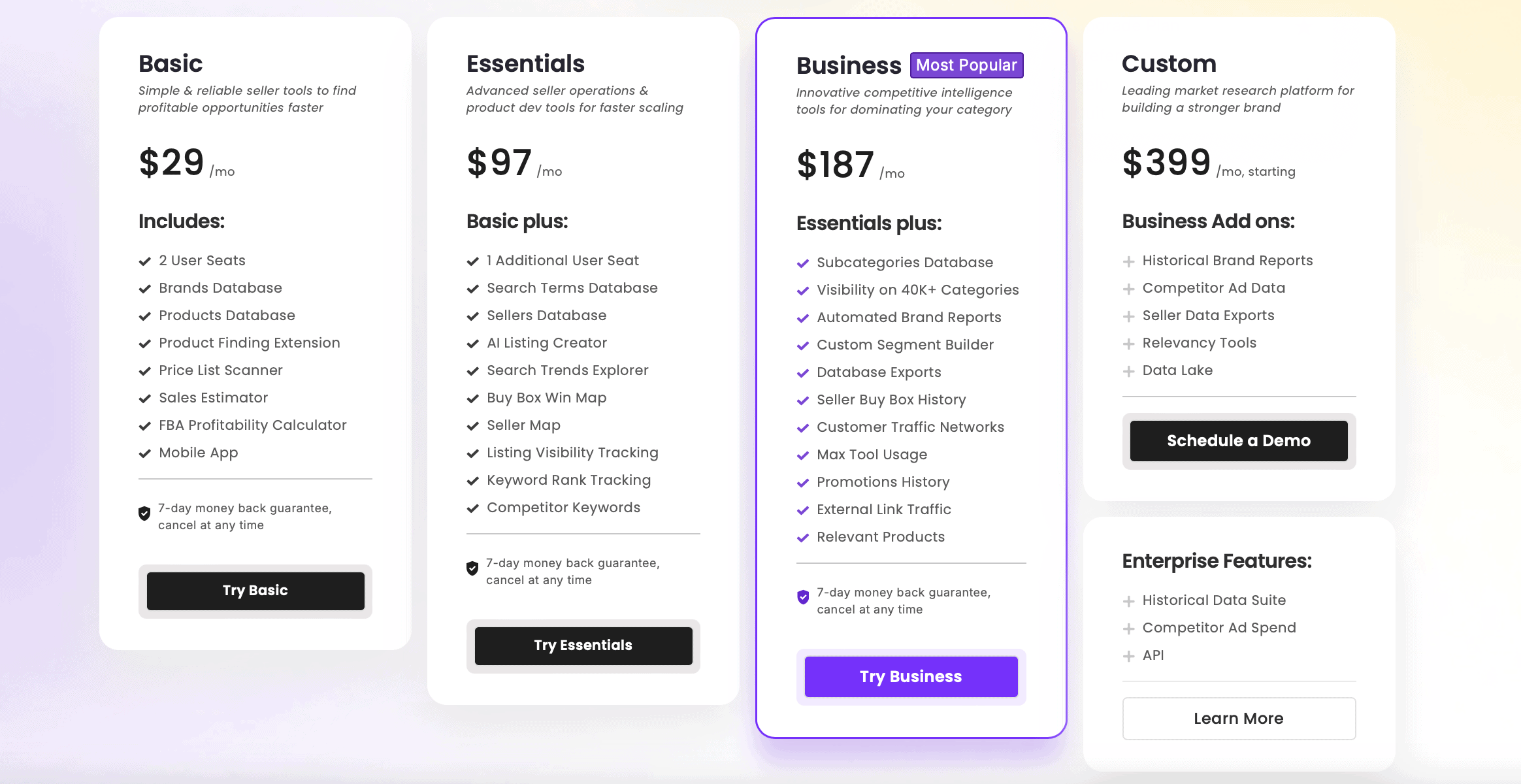
SmartScout offers five pricing tiers. Here’s what you need to know:
- Basic – $29/month: great for beginners, but limited for wholesale sourcing
- Essentials – $97/month: ideal for most Amazon wholesale sellers
- Business – $187/month: adds exports, subcategory analytics, and automation tools
- Custom – starts at $399/month: lets wholesale sellers customize features and add special add-ons
- Enterprise – Custom pricing for teams and agencies
Annual billing lowers the monthly cost across all plans. For most wholesale users, the Essentials plan includes everything you need – like Seller Map, Buy Box Win Map, and detailed seller and brand filters to build a strong sourcing pipeline.
SmartScout also offers a 7-day money-back guarantee so you can try it risk-free.
You can save up to 25% off your first 3 months using our exclusive SmartScout coupon codes. Apply one of our verified discount codes at checkout to unlock the savings and get started at a lower cost.
How Does SmartScout Compare to Other Tools for Amazon Wholesale?
SmartScout vs Seller Assistant
SmartScout and Seller Assistant both target wholesale sellers, but they serve different purposes.
SmartScout is all about discovery. You use it to:
- Find wholesale-friendly brands
- Check if Amazon is selling the product
- See how crowded listings are
- Spot potential suppliers through seller data
It’s what you use to build your outreach list.
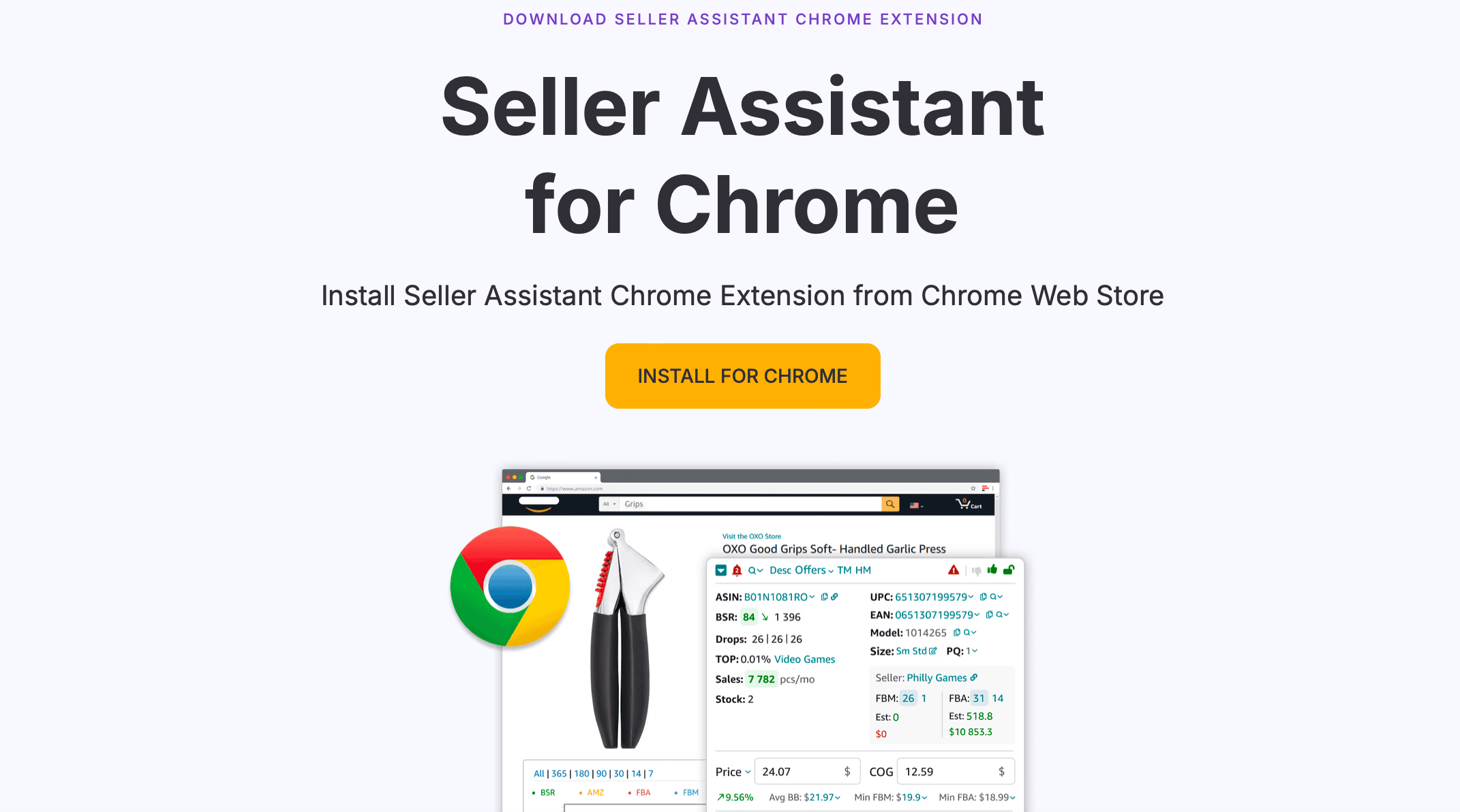
Seller Assistant is more for validation. It’s a browser extension that helps you:
- Check for IP complaints or restrictions
- Run quick profit and ROI estimates
- Review supplier price lists
So the real difference? SmartScout helps you find the right opportunities. Seller Assistant helps you double-check them before you order.
SmartScout vs Keepa

Keepa is a must-have for checking charts – price history, sales rank, and Buy Box trends. It’s great for confirming what a listing has done over time.
But Keepa isn’t built for sourcing. You already need to know the ASIN.
SmartScout gets you to that point. You use it to:
- Discover brands and products
- See seller competition
- Map out potential suppliers
- Then you can use Keepa to validate the data before placing your order.
Together, they’re a smart combo. SmartScout finds the opportunity. Keepa confirms it’s stable.
Frequently Asked Questions
Is Smartscout Good for Amazon Wholesale?
Can I Find Distributors Using Smartscout?
Build a Repeatable Wholesale System with SmartScout
SmartScout gives you more than product data – it helps you build a sourcing system. Focus on one category at a time, apply the filters that matter, and contact 10 qualified leads per week.
After your first PO, use what you’ve learned to improve your process. SmartScout is a tool you can grow with, and the results speak for themselves. The sellers who use it consistently are the ones placing repeat orders month after month.
Ready to try SmartScout? Use our special SmartScout discount to save up to 25% on your first 3 months and turn one product category into a steady stream of wholesale leads.