No matter how great your product is, negative reviews are inevitable on Amazon. Maybe a shipment arrived late, the color looked different in real life, or the buyer simply had a bad day. Whatever the reason, a few bad reviews can hurt your visibility, credibility, and sales.
But here’s the good news: negative feedback doesn’t have to ruin your business. In fact, when handled strategically, it can actually build trust with customers and improve your product long-term.
In this article, we’ll break down why negative reviews matter, how Amazon’s review system works, and what you can do to respond, remove, or prevent them, all while keeping your brand reputation intact.
Key Takeaways
- Negative reviews are part of selling on Amazon, but a thoughtful response can turn them into opportunities to build trust and improve your product.
- Knowing how Amazon’s review system works helps you address feedback properly while staying within the rules.
- Tools like AMZScout’s AI Review Analyzer make it easy to spot patterns in customer feedback so you can fix problems before they hurt your ratings.
Why Negative Reviews Matter
On Amazon, your product reviews are your reputation. Shoppers rarely make decisions based on fancy listings alone. They scroll straight to the stars. In seconds, a handful of comments from strangers can determine whether someone clicks Buy Now or keeps scrolling.
That’s why negative reviews matter so much. A single one-star rating can drag down your average, affect your conversion rates, and even impact your Best Seller Rank (BSR). Amazon’s algorithm heavily favors listings with consistent positive product reviews, so a few bad reviews can ripple through your visibility and sales.
However, negative feedback isn’t necessarily the enemy; it can serve as a valuable source of insight. Complaints often highlight issues you might not see, such as packaging flaws, unclear instructions, or gaps in customer expectations. Sellers who take the time to read and address negative reviews often end up improving their products and customer experience, which can strengthen their brand over time.
In short, while negative reviews can sting, they’re also a reality check and a roadmap for growth if you’re willing to listen.
How Amazon’s Review System Works
Before you can deal with negative reviews, it helps to understand how Amazon’s review system actually works. Not all feedback is created equal and not all of it counts the same.
Amazon separates product reviews (opinions about the item itself) from seller feedback (comments about the buying experience, such as shipping speed, packaging, communication, and so on). Product reviews affect your listing’s rating and visibility, while seller feedback impacts your overall account health.
You’ll also notice two types of reviews:
- Verified Purchase: from customers who bought the product directly through Amazon. These carry more weight and credibility in both ranking and trust.
- Unverified: posted by users who didn’t purchase through Amazon. They can still appear on your listing but may raise questions if they seem unrelated or suspicious.
Now, about what’s not allowed: Amazon’s policy strictly prohibits fake, incentivized, or manipulative reviews. Specifically, sellers should avoid:
- Offering discounts, refunds, or freebies in exchange for positive feedback.
- Asking friends, family, or employees to leave reviews.
- Posting or editing reviews for their own products.
- Encouraging off-topic or abusive comments.
As for contacting buyers, sellers must tread carefully. You can politely reach out through Amazon’s Buyer-Seller Messaging to resolve an issue or clarify a misunderstanding, but pressuring someone to edit or remove their review is against the rules. When you spot something that violates the platform’s policy – say, a fake or defamatory review – use Amazon’s “Report Abuse” feature or open a case with Seller Support.
All in all, the key is to know the rules before reacting. Understanding how the review system works helps you address negative feedback effectively, without crossing any lines.
How to Deal with Negative Reviews on Amazon
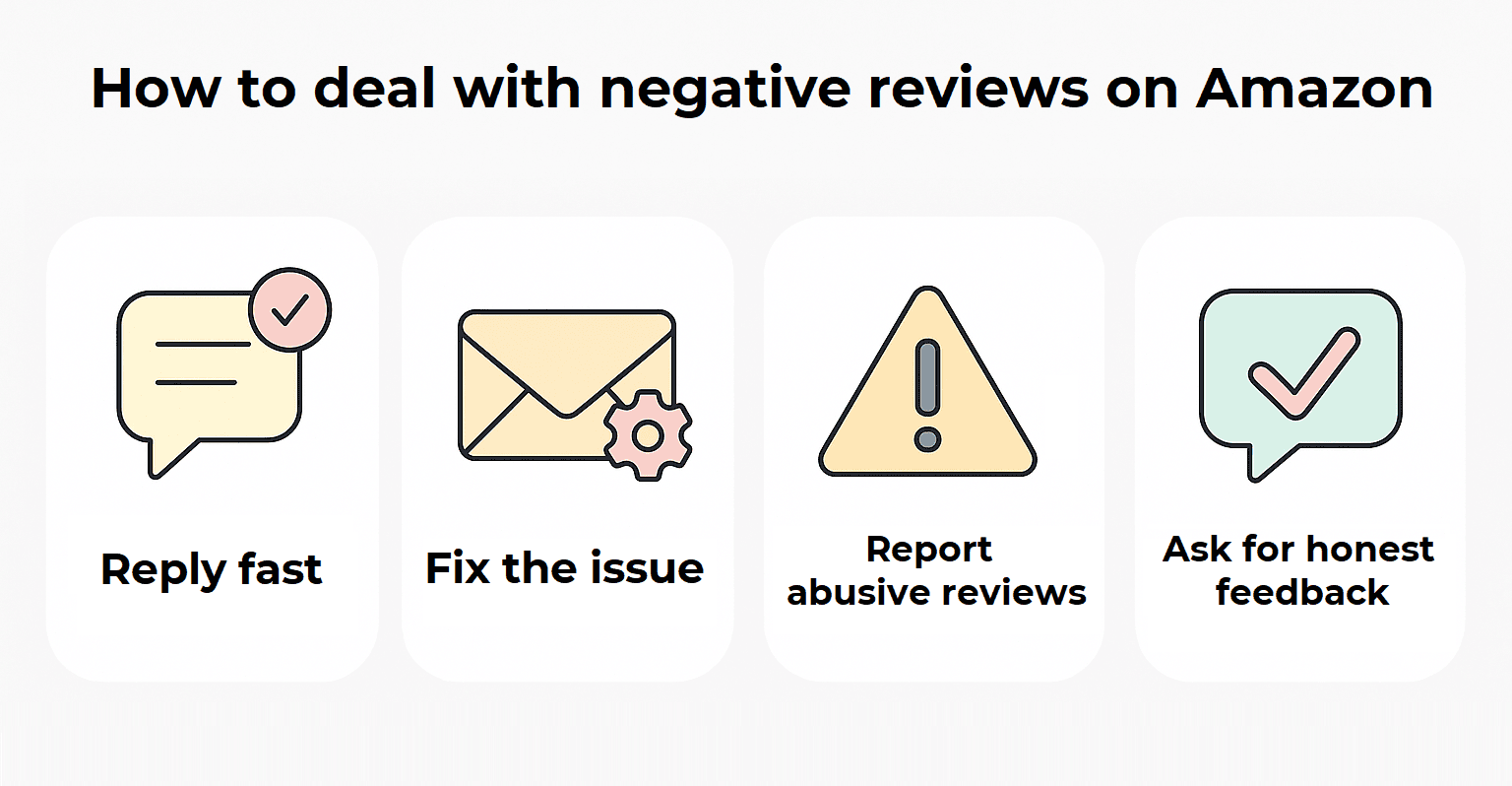
1. Reply Quickly - And Stay Calm
Speed is everything. Responding within a day or two shows you care about your customers and their satisfaction. Keep your reply short, polite, and factual. Don’t argue or get defensive. Instead, acknowledge the problem and thank the buyer for their feedback.
Example: “We’re sorry to hear about your experience and appreciate you bringing this to our attention. We’ve reached out to make things right.”
2. Solve the Customer’s Problem
3. Flag or Report Policy Violations
Some reviews cross the line: fake, abusive, or off-topic comments that violate Amazon’s policy. In these cases, use the “Report Abuse” link next to the review or contact Seller Support. Don’t overuse this option, but if a review is clearly manipulative or irrelevant, Amazon may remove it.
4. Encourage Positive Feedback
You can’t directly ask buyers to change or remove negative reviews, but you can encourage satisfied customers to leave honest feedback. A gentle reminder in your follow-up messages or packaging insert (as long as it complies with Amazon’s rules) can help balance out a few bad reviews with genuine positive ones.
At the end of the day, negative reviews are part of doing business, but they don’t have to define your brand. Responding quickly, addressing issues head-on, and following Amazon’s policy shows both buyers and the algorithm that you’re a reliable seller worth trusting.
How to Prevent Negative Reviews
1. Analyze Your Own and Competitors’ Reviews
Start by looking at recurring pain points in both your product reviews and those of similar items in your category. Are customers complaining about unclear instructions, poor packaging, or missing features? Identifying these patterns helps you anticipate problems before they escalate into negative feedback.
Manually reading hundreds of product reviews can take hours, but modern tools can streamline the process and give you actionable insights quickly. Here are three of the most effective options for Amazon sellers:
- AMZScout AI Review Analyzer: This tool uses AI to process customer reviews and highlight patterns in both positive and negative feedback. It generates visual graphs, detailed statistics, and text-based summaries that make it easy to spot recurring complaints, strengths, and areas for improvement. For example, you might discover that a product is loved for durability but criticized for confusing assembly instructions.
- Helium 10 Review Insights: Helium 10 performs sentiment analysis and highlights frequently mentioned words or issues in reviews. Sellers can track trends over time, see what customers praise or complain about, and benchmark their products against competitors to find opportunities for improvement.
- Jungle Scout Review Automation: This tool aggregates reviews across multiple products and offers automated reporting. It can flag repeated issues, track the overall sentiment of reviews, and help sellers prioritize which product improvements or listing changes will have the biggest impact on reducing negative feedback.
Example: Using AMZScout AI Review Analyzer
With AMZScout’s tool, understanding customer feedback is fast and visual. Let’s take the BELLA Two-Tier Food Steamer, a popular kitchen gadget on Amazon, as an example to see how the AMZScout AI Review Analyzer works in practice.
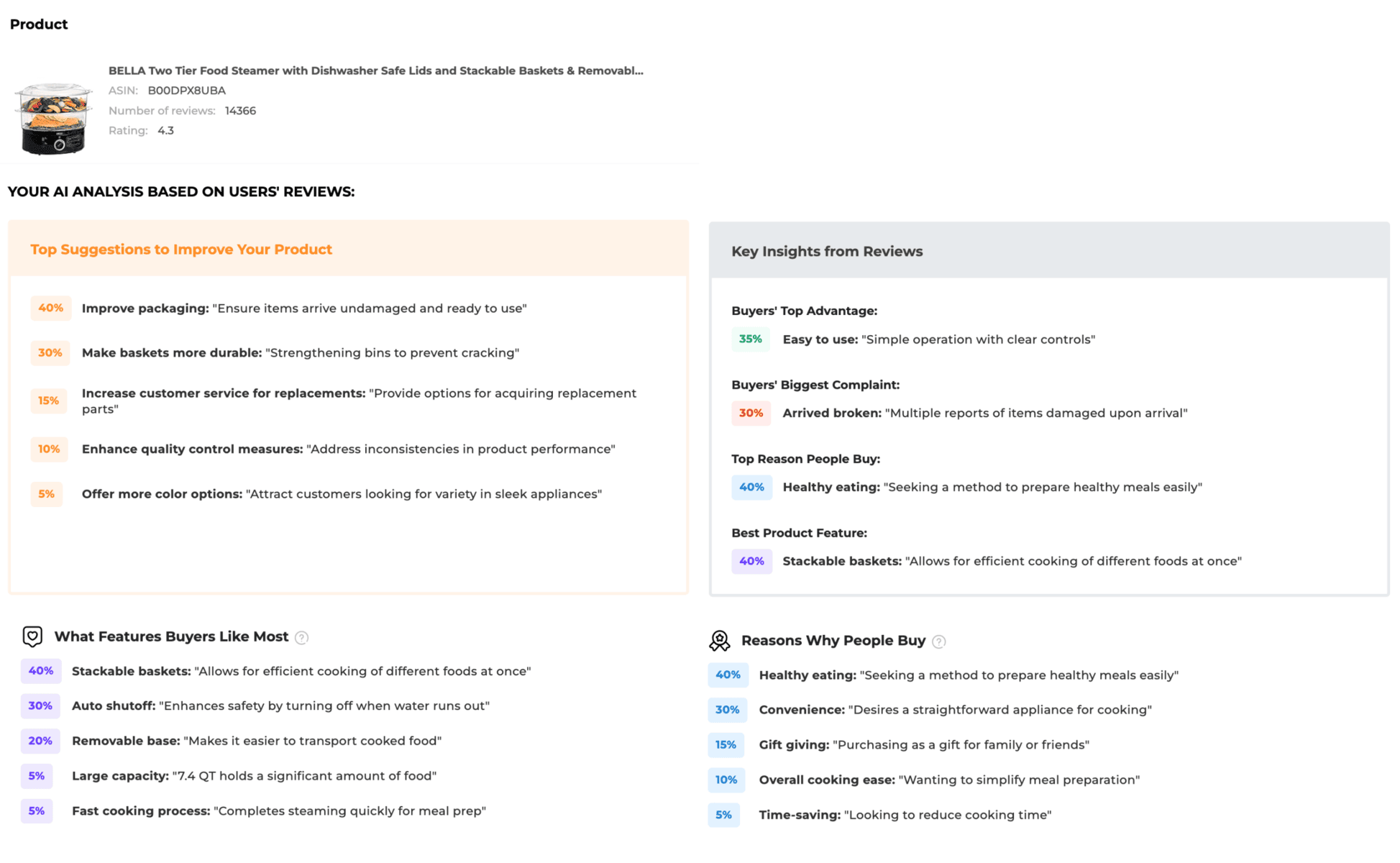
The AI Review Analyzer quickly highlighted some recurring themes from customer feedback:
- Common Complaints: Many buyers mentioned that the steamer arrived damaged or that the baskets felt too fragile. That’s a clear signal for sellers: improving packaging and reinforcing the materials could instantly boost customer satisfaction and cut down on returns.
- What Customers Love: On the positive side, users praised the stackable baskets, the dishwasher-safe design, and the auto shut-off feature. Another favorite? The removable base, which makes it easy to carry or store. These are great selling points to emphasize in listings or product photos.
In just minutes, the AI tool delivers insights that would normally take hours of manual review and note-taking. Sellers can instantly see what’s working and what’s not.
Armed with this data, you can:
- Improve your product design and durability
- Highlight key features customers actually care about
- Write more persuasive, customer-informed product listings
- Reduce the risk of negative reviews before they happen
With tools like AMZScout and its AI Review Analyzer, product research becomes faster, smarter, and more precise. Instead of guessing what customers want, you can know – and that’s a game changer for anyone looking to stay competitive on Amazon.
2. Improve Listing Accuracy
Many negative reviews stem from unmet expectations. Make sure your product listing reflects exactly what customers will receive. Update titles, photos, and bullet points to match the real quality and features of your product.
High-quality, accurate images paired with clear, honest descriptions help shoppers make informed decisions, reducing the risk of disappointment and bad reviews. Think of your listing as a promise. If it’s true to life, customers are far more likely to leave positive feedback.
3. Add Better Product Documentation or Inserts
Confusion leads to frustration. Including clear instructions, manuals, or helpful inserts can prevent unnecessary complaints. A well-crafted guide can answer common questions before the customer even has to ask, making the user experience smoother and more enjoyable. Small touches, like tips for assembly or care, show that you care about the customer’s satisfaction, and satisfied customers are far less likely to leave negative reviews.
4. Use FBA or Reliable Logistics Partners
Fast, reliable delivery is a major factor in customer happiness. Delays, missing packages, or damaged goods are quick triggers for negative reviews. Using Fulfillment by Amazon (FBA) or trustworthy logistics partners ensures timely shipping and professional handling, reducing complaints related to delivery. When customers receive their products quickly and in perfect condition, they are far more likely to leave glowing feedback.
5. Ensure Proper Quality Control
Even the best listings and fastest shipping won’t save a product with quality issues. Implement rigorous quality control measures to catch defects before products reach customers. From sourcing to final inspection, consistent attention to quality can prevent the frustrations that lead to negative reviews. Remember, a flawless product experience builds trust, repeat business, and positive reviews, all of which help your brand thrive.
Frequently Asked Questions
Can Amazon Sellers Remove Negative Reviews?
How Do I Report Fake or Abusive Reviews on Amazon?
Can I Contact the Customer Who Left a Bad Review?
Yes, but carefully. Sellers can reach out via Amazon’s Buyer-Seller Messaging to address concerns or clarify issues. Keep your message polite, professional, and solution-focused. Directly asking a customer to change or remove their review is against Amazon’s rules, but resolving the problem may naturally lead to improved customer satisfaction.
Final Thoughts
Negative reviews are inevitable on Amazon, but they don’t have to hurt your business. When handled thoughtfully, feedback (even bad reviews) can help improve your product, refine listings, and build customer trust. Respond quickly, address issues, follow Amazon’s policies, and use tools like AMZScout’s AI-powered review analysis to understand what customers value most. By treating negative feedback as a roadmap for improvement, sellers can turn challenges into opportunities for growth.