SmartScout product research gives Amazon sellers a clearer, faster way to find profitable products.
Instead of browsing ASINs one by one, SmartScout helps you explore entire subcategories, spot top-performing brands, and uncover real market gaps.
In this guide, you’ll learn how to use SmartScout’s product research tools, follow proven workflows, and validate opportunities with real data.
Let’s break it down.
Key Takeaways
- SmartScout lets you research products by category, brand, and seller.
- It helps you spot real demand and avoid saturated markets.
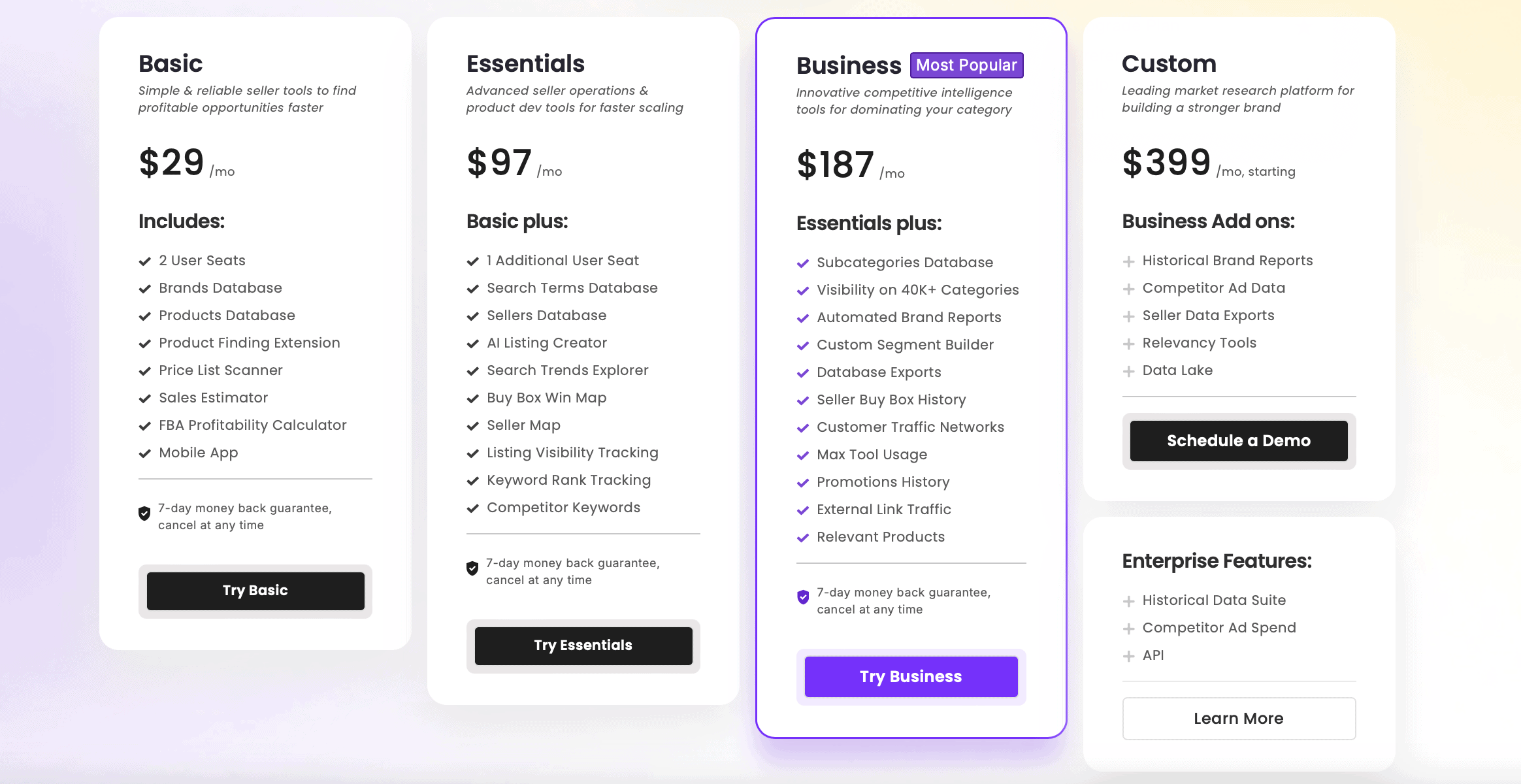
- Product research features start at $29/month, with higher plans unlocking advanced data.
Why You Should Choose SmartScout for Amazon Product Research
SmartScout stands out by offering a different approach to Amazon product research. Instead of just scanning ASINs or chasing high-volume keywords, it helps sellers analyze entire subcategories, uncover brand-level opportunities, and reverse-engineer successful seller catalogs.
With access to over 20 million ASINs that each generate at least $50 in monthly revenue, and up to 5,000 products viewable on a single page, SmartScout is built for sellers who want scale and visibility. You can filter product data using 19 sortable columns, making it easy to drill down into the exact type of opportunities you’re looking for.
This makes it especially useful for wholesale and online arbitrage sellers, but it also works for private label sellers who want to avoid saturated markets and find real gaps in their niche.
Below is a quick snapshot of the main strengths and trade-offs of using SmartScout for product research:
- Sophisticated competitor analytics tools
- Intuitive, visually clear data display
- Budget-friendly entry plan for product research
- Fast discovery of bundle and upsell opportunities
- Access to 20M+ ASINs and up to 5,000 products per page
- Some features are only available for Amazon US
- Not ideal for beginners looking for one-click results
- Requires consistent use to get full value
- Not a full PPC or inventory management suite
- Can feel data-heavy without filters applied
Verdict
What Tools and Features Does SmartScout Offer for Product Research?
SmartScout offers category, brand, seller, and product-level tools that let you analyze the Amazon marketplace from the top down.
Here’s a quick breakdown of its core product research features:
Subcategories
SmartScout’s Subcategories tool lets you browse tens of thousands of Amazon sub‑niches with data on estimated revenue, seller count, and market share. This helps you find underserved niches with demand before you dig into specific products.

Products
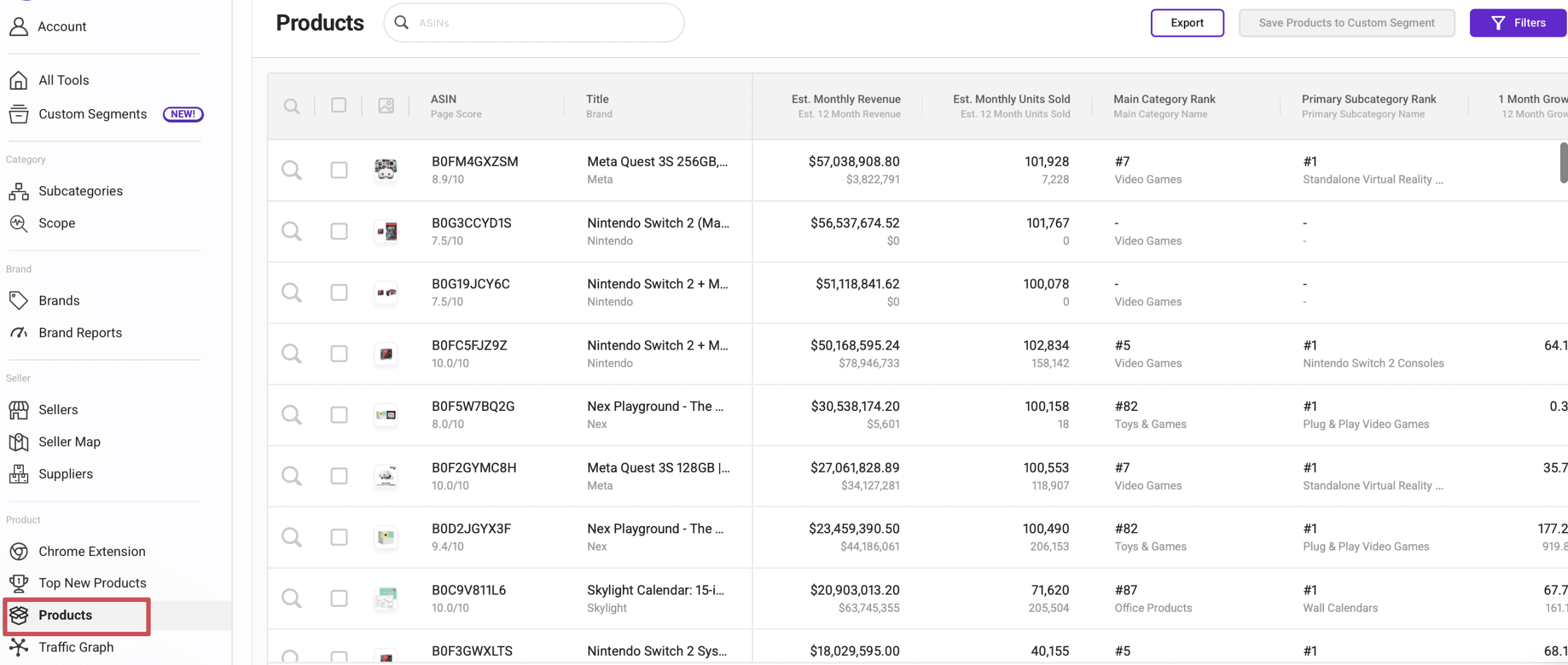
The Products database shows sortable and filterable listings across Amazon with data like sales rank, price, and reviews. You can view thousands of products at once, giving you a broad pool of potential winners to vet.
Brands
Brand analysis lets you see how different brands perform overall – how many products they sell, their approximate revenue footprints, and how heavily Amazon participates in their category. This is especially valuable for wholesale and competitive analysis.

Sellers & Seller Map
The Sellers tool and Seller Map help you examine seller activity – what products they carry and where they operate. You can reverse‑engineer successful catalogs and identify sellers dominating niches you want to enter.

Keyword Tools
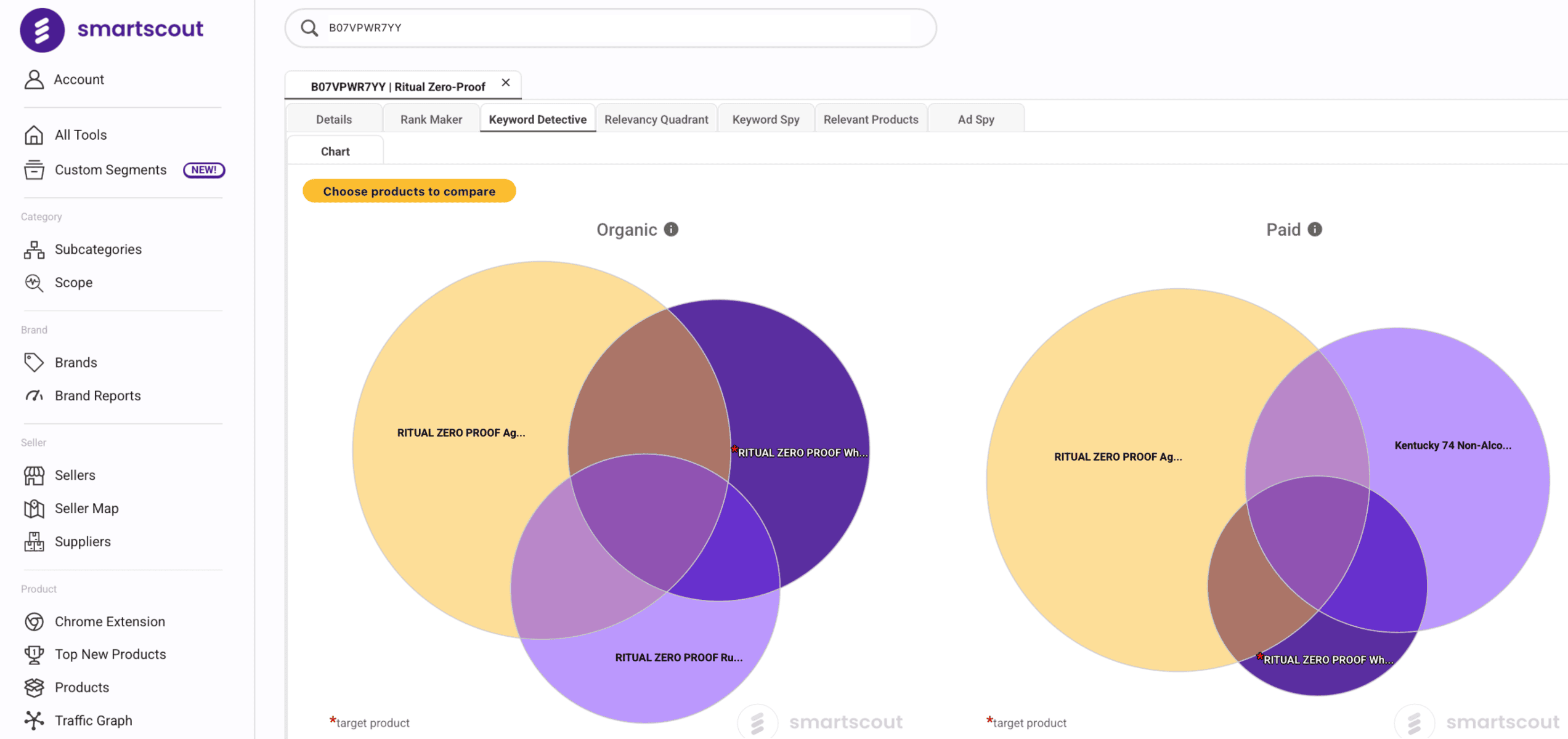
Tools like Keyword Detective and Search Terms Relevancy help you confirm that demand exists for the products you’re considering by revealing which terms drive traffic and how competitive they are in organic search.
Traffic Graph
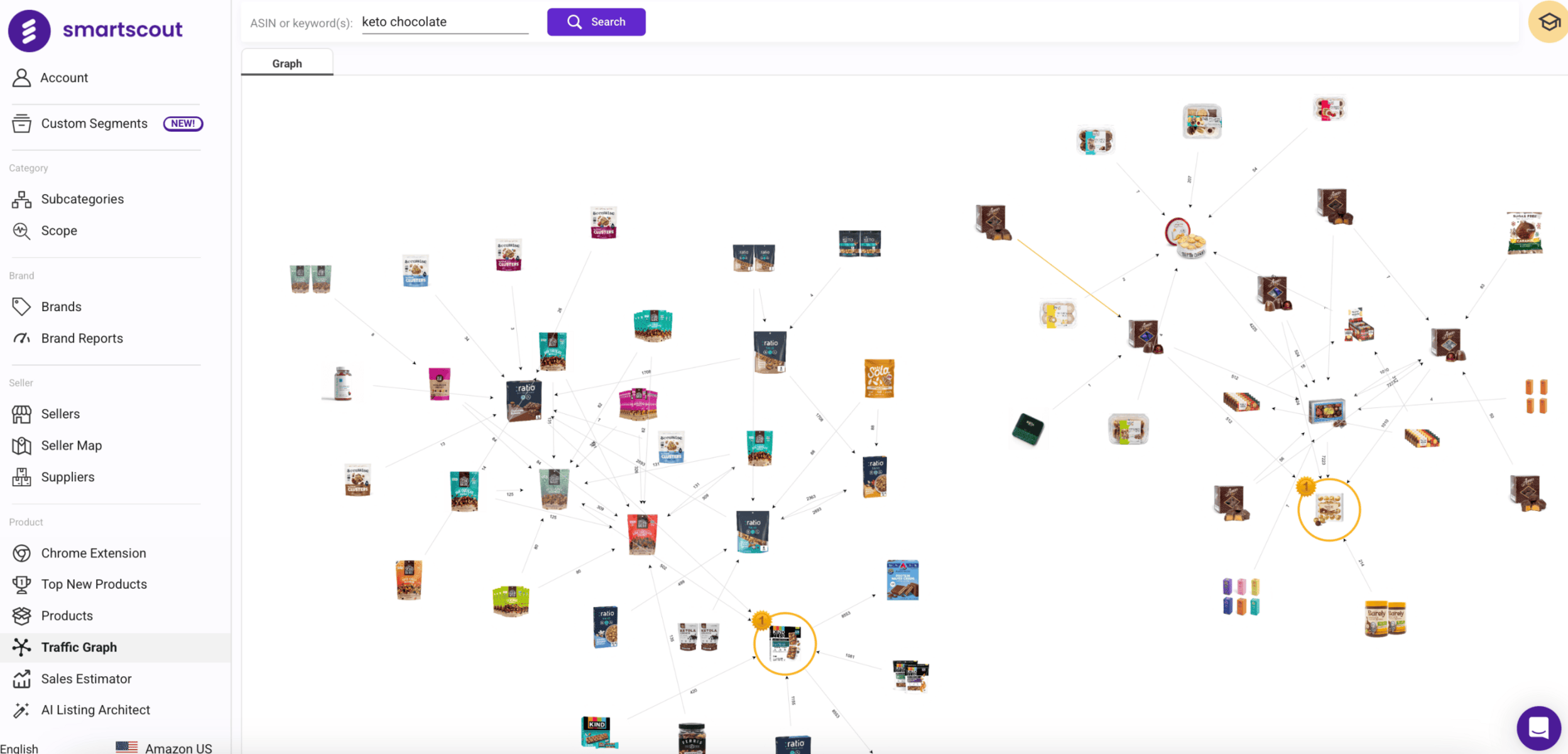
Available at higher tiers, the Traffic Graph shows product‑to‑product connections like “frequently bought together.” This helps reveal complementary items and bundling opportunities that simple product lists overlook.
UPC Scanner & FBA Tools
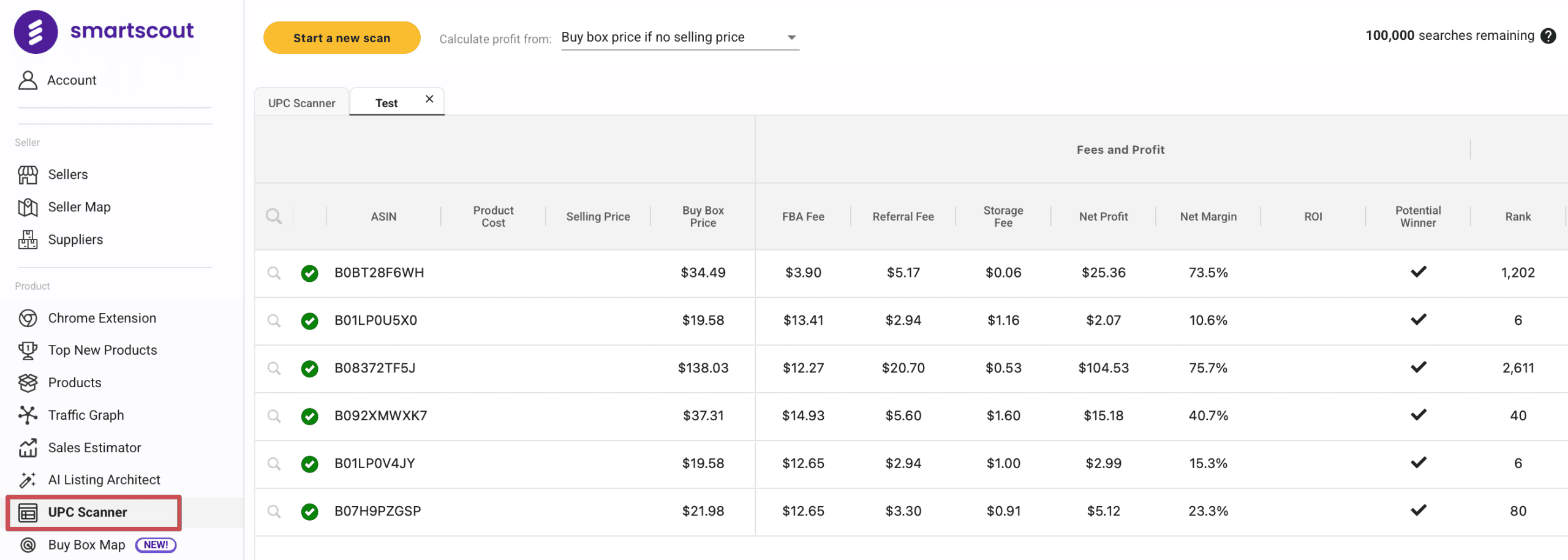
Bulk scanning via UPC Scanner and estimating profitability with the FBA calculator help you quickly validate whether a product or list of products is worth pursuing from a margin and fees perspective.
How to Conduct Amazon Product Research with SmartScout
SmartScout is most effective when you follow a clear, repeatable workflow. Here’s how to use it step by step:
- Find high-potential subcategories: Open the Subcategories tool and filter by revenue, seller count, and Amazon’s market share. Look for niches with strong demand and limited Amazon presence. These give you a better chance to compete.
- Identify promising brands: Use the Brands tool to find brands in that niche with solid revenue and few third-party sellers. These are strong wholesale targets or competitor benchmarks for private label.
- Research sellers: Open the Sellers tool or Seller Map to see which sellers list those brands. Analyze what they’re selling and how deep their catalogs go – you can often spot overlooked products or gaps in their strategy.
- Filter the product database: Go to the Product Database and apply filters like price, BSR, review count, and seller count. Focus on listings with healthy demand and signs of weak competition – like low ratings or poor listings.
- Validate profit margins: Use the Sales Estimator and FBA Calculator to check revenue and profit potential. For bulk research, upload a supplier list into the UPC Scanner to analyze multiple products at once.
- Check search demand: Use Keyword Detective or Search Terms Explorer to confirm that people are actively searching for products in your niche. This is especially useful for private label validation.
- Build your product shortlist: Save the best product ideas, track their performance over time, and repeat the process weekly. SmartScout’s power comes from consistent use – not one-time checks.
How Much Does Product Research with SmartScout Cost?
SmartScout’s product research tools are available on all paid plans. That includes access to Subcategories, Products, Brands, Sellers, the Chrome extension, and profitability tools like the FBA calculator and UPC scanner.
As of now, pricing starts at $29/month for the Basic plan, which gives you the core tools for product discovery. To unlock features like Seller Map, Search Terms, or Traffic Graph, you’ll need to upgrade to Essentials or Business plans.
For a detailed breakdown of what each plan includes, check our SmartScout pricing guide.
Frequently Asked Questions
Can I Find Profitable Products to Sell on Amazon with Smartscout?
Does Smartscout Replace Tools Like Helium 10 or Keepa?
Ready to Take Your Product Research Further?
SmartScout helps you go beyond guesswork. With access to real data on categories, brands, and sellers, you can find better product opportunities faster – and avoid the traps most sellers fall into.
If you’re looking to build a smarter, more repeatable research process, SmartScout is one of the best tools available.
Use our exclusive SmartScout coupon to save up to 25% on your plan and get full access to every product research feature it offers.