
Helium 10 works in the UAE, and you can integrate it with Amazon.ae alongside other marketplaces.
When you sign up for Helium 10 in the UAE, you get access to most features for researching products and boosting sales. This guide will provide all the details on signing up and using Helium 10 in the UAE.
Key Takeaways
- Helium 10 fully supports Amazon.ae for product research, keyword tracking, and listing optimization
- For product research, Helium 10 users in the UAE can try Blackbox, Trendster, and the Chrome extension.
- Amazon UAE sellers can create a free account to try the tool first, then upgrade later for more features.
How Do You Sign Up for Helium 10 in the UAE?
Setting up a Helium 10 account from the UAE takes about five minutes. The process is the same regardless of where you’re located. Here’s how it works:
- Go to Helium 10 homepage and click “Get Started” in the top menu.
- Pick a plan – the pricing page shows Platinum, Diamond, and Enterprise. If you want to test the tools first, Helium 10 also offers a free account that never expires.
- Create your account – enter your name, email, and password, or sign up with Google. You’ll also need to verify your email with a code.
- Enter payment details (if choosing a paid plan) – Helium 10 accepts credit cards and Alipay. Apply a discount code before completing checkout (see the savings section below.)
- Log in and explore your dashboard – from here you can start using tools like Black Box and Cerebro right away.
How Do You Connect Amazon.ae to Helium 10?
Here’s one thing that catches UAE sellers off guard: you can’t connect your Amazon.ae account on Helium 10’s free plan. You need to upgrade to a paid plan first to get connection tokens.
Once you’re on a paid plan, follow these steps:
- Log into your Helium 10 member area.
- Click the Upgrade button if you haven’t upgraded yet.
- Apply a discount code before checkout (REVENUEGEEKS10 or REVENUEGEEKS20.)
- Complete payment and return to your dashboard.
- Go to Settings > Connections in the left menu.
- Click Connect Amazon Account.
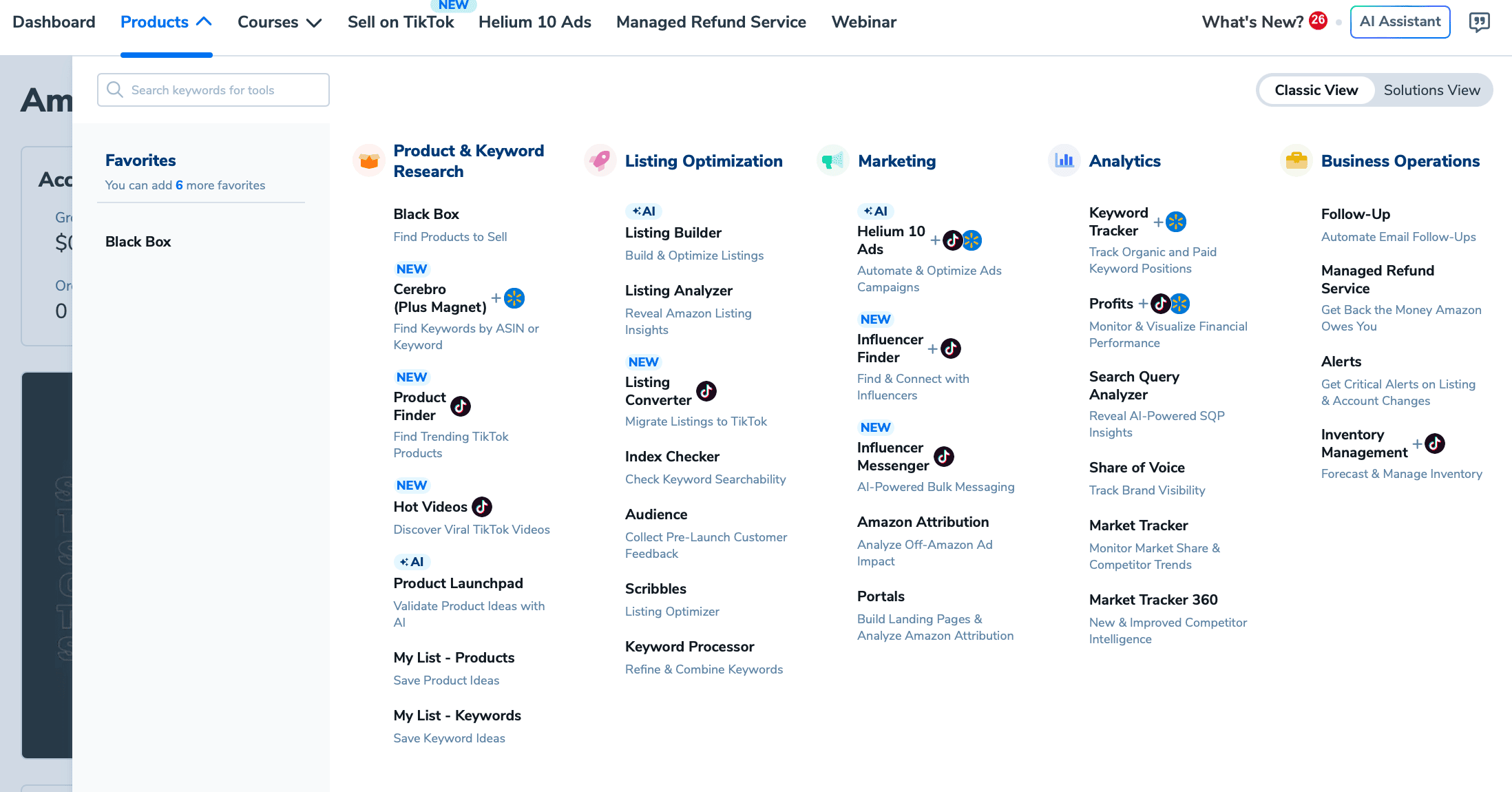
- Select Europe as your region (Amazon.ae falls under the Europe region group.)
- Sign into your Amazon Seller Central account when prompted.
- Authorize Helium 10 to access your seller data.
- You’ll see a confirmation message once the connection is live.
After connecting, features like Refund Genie, Inventory Protector, Alerts, and Helium 10 Ads become available with real-time data from your Amazon.ae account.
Which Helium 10 Tools Work on Amazon.ae?
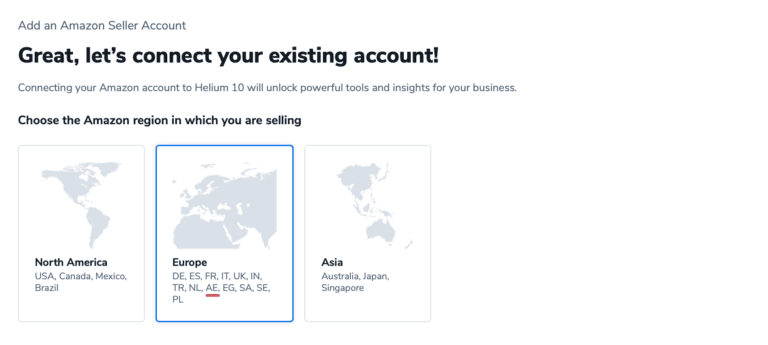
Product Research
Black Box (product database), Trendster (seasonal trends), Xray (Chrome extension), and My List (product shortlists) all work on Amazon.ae. You can switch to the UAE marketplace from the dropdown in each tool.

Keyword Research
Cerebro (reverse ASIN lookup) and Magnet (keyword discovery) both support Amazon.ae, including Arabic keyword inputs. On the free plan you get 2 uses per day for each.
Listing Optimization
Keyword Processor, Listing Analyzer, and Index Checker all work. Scribbles (listing builder) has partial functionality on Amazon.ae.
Operations and Analytics
Alerts, Inventory Protector, Inventory Manager, Refund Genie, Keyword Tracker, Market Tracker 360, and Profits are all available once you connect your Amazon.ae account on a paid plan.
Marketing
Helium 10 Ads (PPC automation for Sponsored Products, Brands, and Display) and Portals (landing pages) both work for Amazon.ae.
Tools NOT Available for UAE
Helium 10’s suite has grown to over 30 tools, and not all of them support every marketplace.
Misspellinator (English typo detection) and Follow-Up (automated post-sale emails) are confirmed unavailable for Amazon.ae. Newer additions like Product Listing Converter (Amazon-to-TikTok export), Influencer Finder, and Seller Assistant are US-focused and may have limited or no Amazon.ae support.
None of these are essential for UAE sellers. The core research, keyword, listing, and analytics tools all work on Amazon.ae, which is what matters for day-to-day selling.
What Are the Helium 10 Pricing Plans for UAE Sellers?
Helium 10 prices all plans in USD regardless of your location. UAE sellers pay the same rates as sellers anywhere else. Here’s the current pricing breakdown:
| Plan | Monthly Billing | Annual Billing | Annual Savings |
|---|---|---|---|
| Free | $0 | $0 | – |
| Platinum | $129/month | $99/month | $360/year |
| Diamond | $359/month | $279/month | $960/year |
| Enterprise | Custom | From $1,499/month | Custom |
All paid plans come with a 7-day money-back guarantee, so there’s minimal risk in trying one out.
Which Plan Should UAE Sellers Pick?
For most sellers starting out on Amazon.ae, the Platinum plan hits the sweet spot. It gives you full access to Black Box and keyword tools without the agency-level price of Diamond. If you’re just testing the waters, the free plan works – but remember, you can’t connect your Amazon.ae account until you upgrade.
How Can You Save Money on Helium 10 in the UAE?
Two strategies work well here. First, always start with the free plan to make sure Helium 10 fits your workflow. The free plan never expires, so there’s no rush.
Second, when you’re ready to upgrade, use one of these exclusive discount codes at checkout:
- REVENUEGEEKS20 – 20% off your first 6 months on any paid plan
- REVENUEGEEKS10 – 10% off every month for the life of your subscription
These codes have no expiration date and work for both new and existing users.
To apply the code, the easiest way is to click our discount link so the discount applies automatically at checkout. If needed, you can also paste the code into the coupon field and click “Apply” before completing payment.
Is the Amazon UAE Market Worth Entering in 2026?
Amazon.ae attracts around 24 million monthly visitors, and the broader UAE e-commerce market is growing at 11.52% year over year (Mordor Intelligence). Amazon has also committed to hosting products from 100,000 businesses on Amazon.ae by 2026 (Retail TouchPoints).
The infrastructure is there, too. Amazon now operates fulfillment centers in both Dubai and Abu Dhabi, with the newest Abu Dhabi facility offering storage capacity of 8 million units across 30+ product categories. Nearly half of that capacity is reserved for FBA sellers (Gulf News).
What does this mean for Helium 10 users? More infrastructure means faster delivery, which means higher conversion rates, which means more reliable data in your Helium 10 research tools. The marketplace is maturing quickly.
Frequently Asked Questions
Can I Pay for Helium 10 in UAE Dirhams?
No. Helium 10 only accepts payments in USD. Your bank or credit card provider will convert the charge from USD to AED at the current exchange rate. Some cards add a foreign transaction fee, so check with your bank before subscribing.
How Does the UAE Amazon Market Compare to the US Market?
The UAE Amazon market is relatively smaller in size and product selection compared to the US Amazon website. The UAE Amazon market also has localized offerings and features tailored to UAE customers’ specific needs and preferences, including language options, regional promotions, and targeted marketing strategies.
How Do I Contact Customer Support When Using Helium 10 From the UAE?
Once you’ve registered with Helium 10, you can contact customer support via the live chat feature, which is available on the bottom right side of your dashboard.
Also, you can email them at support@helium10.com.
Can Helium 10 Handle Arabic Keywords in the UAE?
Start Using Helium 10 on Amazon.ae
Helium 10 gives UAE sellers access to nearly every tool in its suite, and the Amazon.ae marketplace is growing fast enough to make those tools worth the investment. Whether you’re doing product research with Black Box, tracking keywords with Cerebro, or monitoring competitors with Alerts, the platform works the same way it does on larger marketplaces.
Start with the free plan to test the waters, then try Helium 10 with 20% off your first 6 months using code REVENUEGEEKS20 when you’re ready to connect your Amazon.ae account and unlock the full toolkit.


